MCP Server: How to Safely Expose Your Databases to AI Agents
AI agents are becoming essential productivity tools — from GitHub Copilot to custom enterprise assistants. But every agent that needs to "talk to the database" creates a security question: how do you give AI access to data without giving it the keys to the kingdom?
The Problem: AI Agents Need Data
Modern AI agents don't just answer questions — they take actions. A typical enterprise agent might need to:
- Look up customer information to answer support questions
- Query inventory levels to make recommendations
- Generate reports by aggregating data across tables
- Create database records based on user requests
To do any of this, the agent needs database access. And that's where things get dangerous.
Why Direct Database Access is a Bad Idea
The naive approach — giving your AI agent a connection string — creates serious risks:
- Credential exposure — Connection strings in agent configs can leak through logs, prompts, or misconfigured tools
- Unbounded access — The agent can access ALL tables, ALL rows, ALL data — even what it shouldn't see
- No audit trail — You can't tell which AI action modified which row
- SQL injection surface — AI-generated SQL could contain unintended operations (DROP TABLE, anyone?)
- No rate limiting — A runaway agent loop could overwhelm your database
Enter MCP: Model Context Protocol
The Model Context Protocol (MCP) is an open standard that defines how AI agents communicate with external tools and data sources. Instead of giving agents raw access to databases, you give them access to an MCP Server — a governed intermediary that:
- Exposes specific capabilities — not raw SQL, but defined operations
- Enforces permissions — the agent can only do what you explicitly allow
- Logs everything — every request, every response, every action
- Sanitizes inputs — prevents SQL injection and malformed queries
- Controls output — limits data volume and redacts sensitive fields
How DataKook's MCP Server Works
DataKook includes a built-in MCP Server that turns your databases into governed AI-accessible resources:
Architecture
┌─────────────────┐     ┌──────────────────┐     ┌─────────────────┐
│   AI Agent      │────▶│  DataKook MCP    │────▶│  Your Databases │
│ (Copilot, GPT, │     │  Server          │     │  (SQL Server,   │
│  Custom Agent)  │◀────│                  │◀────│   PostgreSQL,   │
│                 │     │  • Auth          │     │   MongoDB...)   │
└─────────────────┘     │  • RBAC          │     └─────────────────┘
                        │  • Audit         │
                        │  • Rate Limiting │
                        │  • Sanitization  │
                        └──────────────────┘
What the Agent Sees
Instead of raw SQL access, your AI agent gets structured tools:
Available MCP Tools (example):
• list_tables        → Get available tables and their descriptions
• describe_table     → Get columns, types, and relationships for a table
• query_data         → Run a read-only query (SELECT only, validated)
• insert_record      → Create a new record (schema-validated)
• update_record      → Update a specific record by ID
• get_statistics     → Aggregated counts, averages (no raw data)
What the Agent Can't Do
- Access tables not explicitly exposed
- Run DDL operations (CREATE, DROP, ALTER)
- Query without proper authentication
- Exceed rate limits or data volume caps
- See columns marked as restricted (SSN, passwords, etc.)
Setting Up MCP Server in DataKook
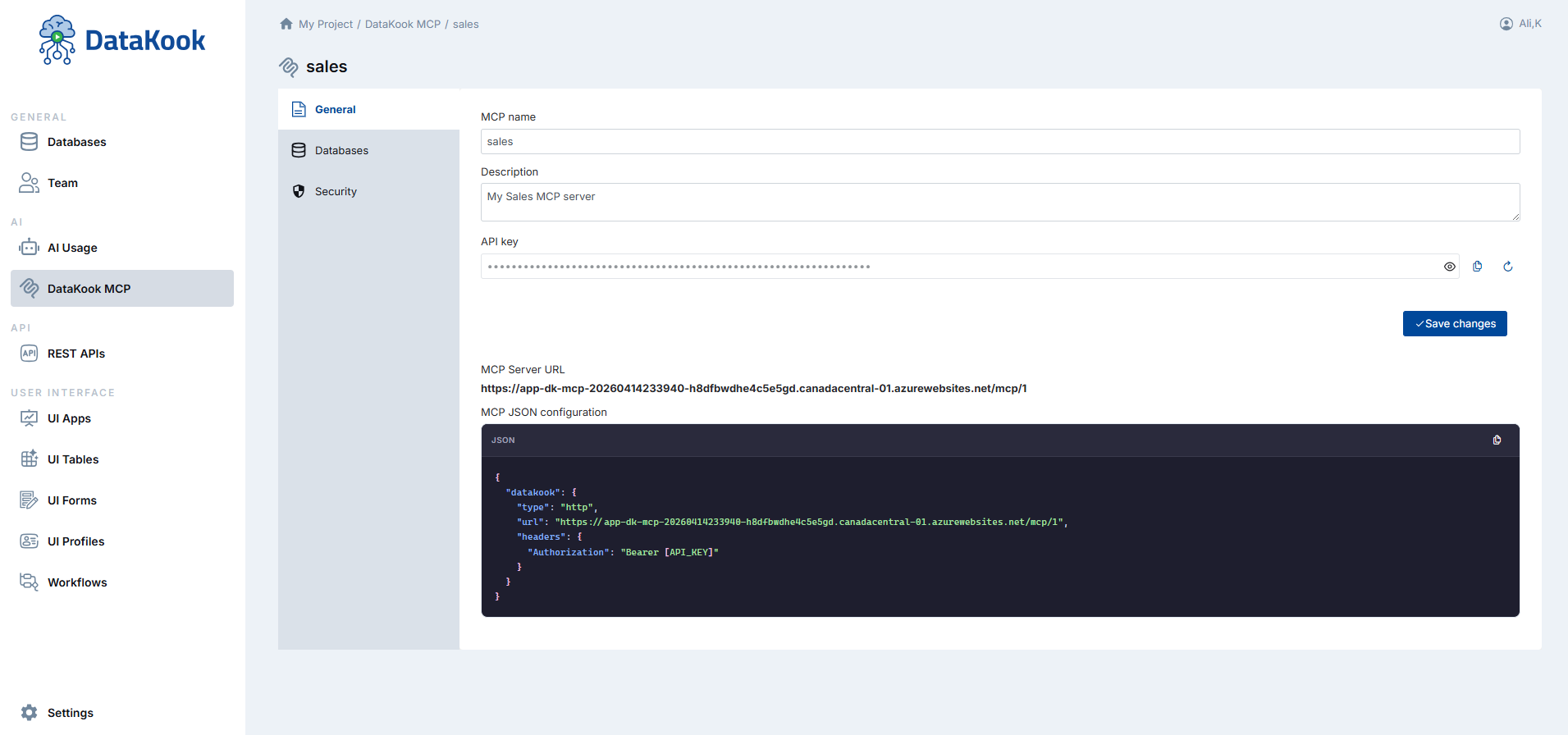
- Enable MCP Server — Toggle it on in DataKook settings
- Select exposed databases/tables — Choose what AI agents can access
- Configure permissions — Read-only? Read-write? Which columns are visible?
- Set rate limits — Max queries per minute, max rows returned
- Connect your agent — Point your MCP-compatible AI tool at the DataKook endpoint
Compatible AI Tools
DataKook's MCP Server works with any MCP-compatible client:
- GitHub Copilot — In VS Code and JetBrains IDEs
- Claude — Anthropic's AI assistant
- Custom agents — Built with LangChain, Semantic Kernel, AutoGen, or any MCP client SDK
- Enterprise platforms — Microsoft Copilot Studio, custom GPTs
Security Comparison
| Approach | Risk Level | Governance |
|---|---|---|
| Direct connection string to agent | 🔴 High — full access, no limits | None |
| Custom API wrapper (hand-built) | 🟡 Medium — depends on implementation | Manual (you build everything) |
| DataKook MCP Server | 🟢 Low — governed, audited, rate-limited | Built-in RBAC, audit, controls |
Real-World Use Case
Imagine a customer support AI agent that needs to look up order information:
Without MCP: Agent has a PostgreSQL connection string. It can query any table — customer SSNs, payment details, internal notes. If compromised, attacker has full database access.
With DataKook MCP: Agent can only callget_order_status(order_id)andget_customer_name(customer_id). No raw SQL. No access to payment tables. Every call logged. Rate limited to 100 requests/minute.
Getting Started
DataKook's MCP Server is available on all plans. Deploy DataKook from the Azure Marketplace, connect your databases, and enable MCP Server — your AI agents get governed data access in minutes.